Starting a blog for free sounds simple until you open ten browser tabs and every article tells you something different. One article says Blogger is outdated. Another says WordPress is the only serious option. A third compares Blogger to self-hosted WordPress.org, then recommends paid hosting before you have even written your first post.
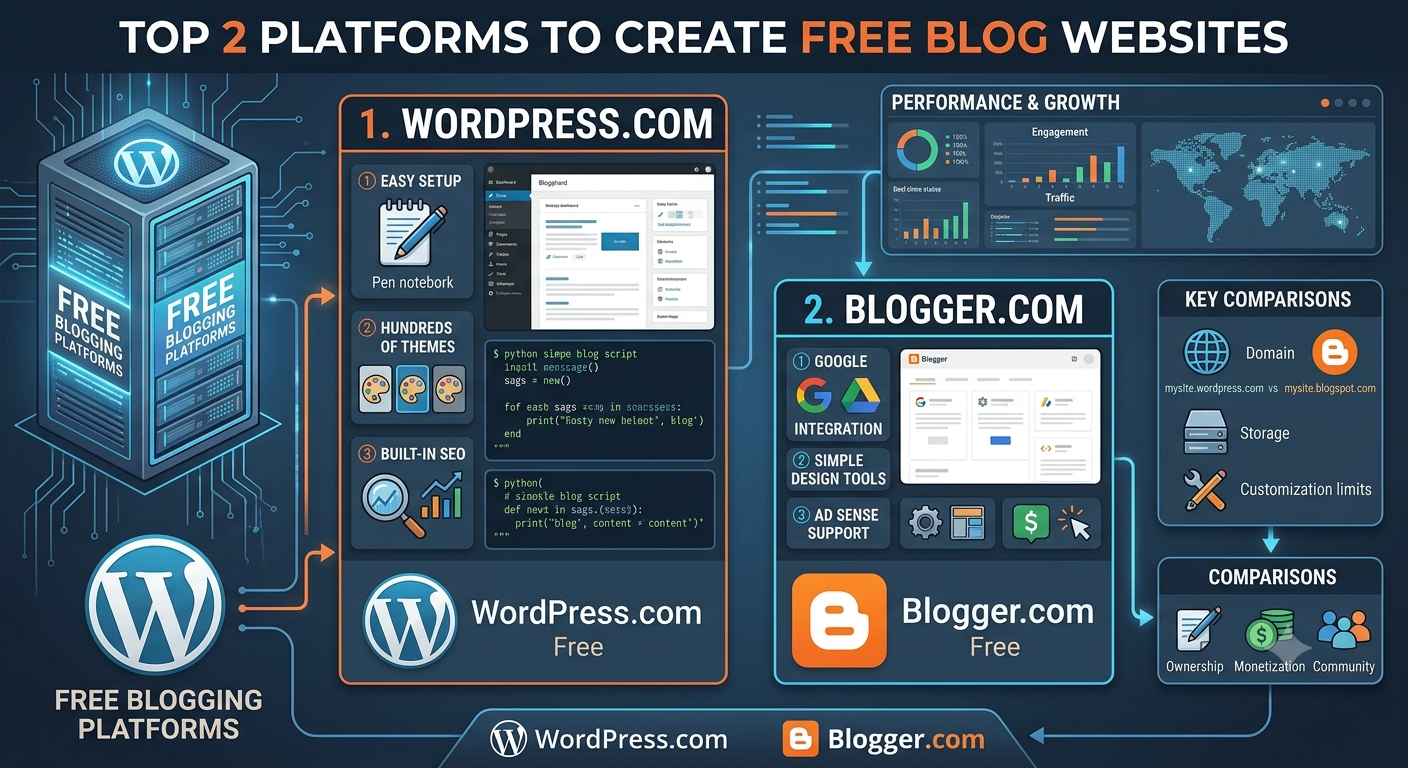
Here is the practical truth: if you want to create a blog website for free, the two most useful choices for most beginners are still Blogger and WordPress.com. This guide compares Blogger vs WordPress.com from a beginner point of view, including design, SEO, custom domains, monetization, setup, use cases, mistakes, and what to do in your first 30 days.
If you are completely new, you may also want to read our beginner guide on how to start a blog and our blog SEO checklist after choosing your platform.
Quick Verdict: Which Free Blogging Platform Should You Choose?
If you want the fastest answer, choose Blogger if you want the simplest, lowest-cost way to publish posts and potentially connect a custom domain without paying for a platform plan. Choose WordPress.com if you want better-looking designs, a modern editor, and a smoother upgrade path, though the free plan has more restrictions.
Best for complete beginners: Blogger, because it is simple, lightweight, and connected to your Google account.
Best for design and presentation: WordPress.com, because its free themes usually look more modern.
Best for custom domains: Blogger, because you can connect a purchased domain without a paid Blogger plan.
Best for monetization: Blogger, because it is generally more flexible for beginner ads, affiliate links, and simple monetization.
Best for long-term growth: WordPress.com, especially if you may later move toward WordPress.org, plugins, e-commerce, or a more professional website.
Pro tip: If your top priority is cost, choose Blogger. If your top priority is presentation and future growth, choose WordPress.com.
Blogger vs WordPress.com at a Glance
Both are among the best free blog sites, but they solve different beginner problems. Blogger is best for fast publishing and low cost. WordPress.com is best for polished presentation and a stronger upgrade path.
Owned by: Blogger is owned by Google. WordPress.com is operated by Automattic.
Free subdomain: Blogger gives you a Blogspot address. WordPress.com gives you a WordPress.com address.
Free hosting: Both platforms include free hosting.
Custom domain: Blogger allows custom domain connection with a purchased domain. WordPress.com usually requires a paid plan.
Design quality: WordPress.com generally looks more modern.
Editor: Blogger has a simpler editor. WordPress.com uses a more flexible block editor.
Monetization flexibility: Blogger is usually more flexible on a free setup.
Best users: Blogger suits students, hobby blogs, simple personal blogs, and niche tests. WordPress.com suits portfolios, personal brands, writers, freelancers, and future upgrades.
Before You Choose: What a Free Blogging Platform Really Includes
A free blog website builder gives you the basic tools to publish online without paying for hosting. That is useful, but free always comes with trade-offs. Think of it like moving into a furnished apartment. You can live there immediately, but you do not own the building and you cannot change everything.
When you use Blogger or WordPress.com, the platform hosts your blog for you. You do not need to buy web hosting, install software, manage servers, or handle technical maintenance. The platform gives you a dashboard, publishing tools, templates, storage, security, and a free subdomain.
A subdomain is the free address you get from the platform, such as yourblog.blogspot.com or yourblog.wordpress.com. A custom domain is your own branded address, such as yourblog.com. For a deeper explanation, read our custom domain guide.
You own your words, images, ideas, and brand direction. However, the platform controls the environment, including server access, advanced SEO settings, plugin installation, design code, platform policies, and some monetization rules.
A free platform is enough for practicing writing, sharing personal stories, school projects, simple portfolios, hobby blogs, niche testing, and learning SEO basics. It is usually not enough for serious e-commerce, advanced analytics, complex integrations, or full monetization control.
Blogger Review: Simple, Free, and Still Useful
This Blogger review starts with a fair point: Blogger can feel old-fashioned. But older does not automatically mean useless. For the right beginner, Blogger removes nearly every barrier between you and publishing.
Blogger is Google’s free blogging platform. Blogs created on Blogger usually use the Blogspot subdomain unless you connect a custom domain. It is designed for straightforward blogging: write a post, publish it, organize it with labels, and share it.
Key Blogger Features
Free hosting
Free Blogspot subdomain
Basic themes and layout widgets
Simple post editor
Labels for organization
Comments
Google account integration
Basic stats
Google Analytics and Search Console options
Blogger custom domain support
AdSense integration, subject to eligibility
Pros of Blogger
The biggest advantage of Blogger is simplicity. You can focus on writing instead of configuring a website. It is useful for students, hobby bloggers, teachers, classroom projects, personal journals, community groups, and simple niche experiments.
Cons of Blogger
The disadvantages are real: limited design flexibility, fewer modern templates, a less professional default appearance, a smaller ecosystem, basic SEO controls, no plugin ecosystem, and less flexible page building.
Pro tip: If you choose Blogger, spend less time trying to make it look like a premium website and more time creating useful content.
WordPress.com Review: Better Design, More Limits on the Free Plan
WordPress.com feels more modern than Blogger. It gives you cleaner design, stronger visual presentation, and a better path if your blog becomes something bigger. However, the WordPress.com free plan has important limits.
WordPress.com is a hosted blogging and website platform based on WordPress software. You sign up, choose a plan, select a theme, and start publishing. On the free plan, your site usually uses a WordPress.com subdomain.
WordPress.com is not the same as WordPress.org. WordPress.com is hosted for you and has a free plan. WordPress.org is open-source software you install on paid hosting, so it is not truly free for beginners. If this distinction confuses you, see our guide to WordPress.com vs WordPress.org.
Key WordPress.com Free Plan Features
Free hosting
WordPress.com subdomain
Free themes
Modern block editor
Basic customization
Security and maintenance
Simple stats
Categories and tags
Mobile-friendly themes
Pros of WordPress.com
WordPress.com is especially good for appearance and structure. It works well for portfolios, personal brands, freelancers, writers, artists, designers, photographers, consultants testing content, and anyone who may upgrade later.
Cons of the WordPress.com Free Plan
The limits include no custom domain on the free plan in most cases, no plugins, limited monetization, limited advanced customization, possible platform branding or ads, and fewer third-party integrations.
Pro tip: If you choose WordPress.com, pick a simple theme first. Choose readability over clever design.
Blogger vs WordPress.com: Feature-by-Feature Comparison
The Blogger vs WordPress debate is often confusing because many articles compare Blogger with self-hosted WordPress.org. For beginners who want to start free, the clearer comparison is Blogger vs WordPress.com.
Cost and Free Plan Limits
Blogger is more generous if your goal is to stay free long-term. WordPress.com has a free plan, but many important features require upgrades.
Ease of Use
Blogger is easier because there are fewer features. WordPress.com is still beginner-friendly, but the dashboard has more choices and can take longer to learn.
Themes and Design Flexibility
WordPress.com wins on themes and design. Blogger themes are functional, but WordPress.com usually gives beginners a more professional-looking starting point.
Writing and Editing Experience
WordPress.com has the stronger writing environment because the block editor supports richer layouts. Blogger is better if you want a simpler post editor with fewer distractions.
SEO Features
Neither free platform gives the same SEO control as a self-hosted WordPress site with plugins. For most beginners, the bigger SEO issue is not the platform. It is whether your content answers real search questions. Our blog post ideas guide can help you choose topics with search demand.
Analytics and Tracking
Blogger integrates naturally with Google Analytics and Google Search Console. WordPress.com has built-in stats, with more advanced integrations often tied to paid plans.
Security and Maintenance
Both platforms handle security and maintenance for you, which is a major benefit of hosted free blog hosting sites.
Custom Domains: Blogger vs WordPress.com
Custom domains matter because they shape how people remember you. A blog called sarahwrites.com feels more professional than sarahwrites123.blogspot.com or sarahwrites.wordpress.com.
With Blogger, you can buy a domain from a registrar and connect it to your blog by updating DNS settings. Blogger does not charge a paid platform plan just to connect the domain.
On WordPress.com, custom domains are generally tied to paid plans. WordPress.com often makes domain setup easy, but that convenience usually comes with plan requirements.
A free blog with custom domain can be misleading language. On Blogger, the platform can remain free, but the domain still costs money. On WordPress.com, you usually pay for both the domain and a plan that allows domain connection.
Pro tip: Before buying a domain, check the renewal price, not just the first-year discount.
Monetization: Can You Make Money With a Free Blog?
Yes, you can start a blog for free and potentially make money. But a free blog is not a money machine. It is more like planting a garden: the platform is the soil, but the harvest depends on niche, content, consistency, traffic, trust, and strategy.
Blogger monetization options include Google AdSense if approved, affiliate links, sponsored posts, digital product links, service promotion, basic email list promotion, brand partnerships, sponsored resource pages, and simple lead generation. For ethical earning basics, read our affiliate marketing for beginners guide.
The WordPress.com free plan is more restrictive. You generally cannot install ad network scripts, add monetization plugins, or fully control advertising. Affiliate links may be allowed when they follow policy, but the free plan is not built for aggressive monetization.
Affiliate marketing requires clear disclosure, relevant recommendations, honest comparisons, and helpful content first. Avoid spammy link stuffing and do not pretend you used products you have not used.
AdSense approval is not automatic. Publish quality content, create About, Contact, and Privacy pages, and make the blog easy to navigate before applying.
Pro tip: Do not monetize every post immediately. First publish helpful informational content, then add monetized comparison posts, tutorials, roundups, or service pages.
SEO Comparison: Do Free Blogs Rank on Google?
Yes, free blogs can rank on Google. Blogspot blogs can rank, and WordPress.com blogs can rank. Platform choice matters less than crawlability, usefulness, relevance, and trust.
Blogger works well with Google Search Console, which helps you monitor indexing and search performance. WordPress.com handles many technical basics, including hosting, security, and mobile-friendly themes. If you are new to indexing, follow our Google Search Console guide.
On both platforms, pay attention to clear post titles, descriptive URLs, headings, image alt text, internal links, helpful introductions, search-focused answers, readable formatting, short paragraphs, examples, and updated information.
Beginner SEO Checklist
Does the post answer a real question?
Is the title clear and specific?
Does the introduction help immediately?
Are headings easy to scan?
Did you include original examples?
Did you link to related posts?
Did you add useful image alt text?
Is the post mobile-friendly?
Did you inspect the URL in Search Console?
Would you trust this article if you found it on Google?
Pro tip: Start with long-tail topics like how to meal prep in a dorm without a kitchen instead of broad topics like meal prep.
Practical Use Cases: Which Platform Fits Your Situation?
The best platform to start a blog depends on your life. A student does not need the same setup as a future business owner, and a hobby blogger does not need the same tools as a freelance designer.
Best free blogging platform for students: Choose Blogger for assignments, journals, essays, and class projects. Choose WordPress.com for public portfolios and writing samples. Students can also review our student blogging guide.
Best for personal blogs: Both work. Blogger is good for casual writing. WordPress.com is better if you want a personal brand.
Best for portfolios: WordPress.com is usually better because its themes and page-building tools make projects and case studies look intentional.
Best for hobby blogs: Blogger is excellent because it stays simple and low maintenance.
Best for niche testing: Blogger can test ideas with no budget. If the niche becomes a business, you may eventually need WordPress.com paid plans or WordPress.org.
Choose Blogger if you have no budget, want to publish today, want a custom domain cheaply, care less about design, want basic monetization flexibility, and prefer low maintenance. Choose WordPress.com if you care about design, want a portfolio, may upgrade later, like modern editing tools, and want your blog to feel like a website.
Industry Examples: Blogger vs WordPress.com by Niche
Education and classroom blogs: Blogger is usually better because setup is simple and Google account integration is convenient.
Student portfolios: WordPress.com is better because page layouts look more polished.
Food blogging: Blogger works for testing; WordPress.com is better when visuals matter.
Travel journals: Blogger is strong for simple publishing.
Photography portfolios: WordPress.com is usually better because of visual themes.
Freelance writing: WordPress.com is stronger for portfolio presentation.
Personal finance niche testing: Blogger may be better because early monetization is more flexible.
Book reviews: Blogger is simple and effective for post-based publishing.
Nonprofit storytelling: WordPress.com can create more polished mission pages.
Real-World Beginner Scenarios
Scenario 1: A university student starts a study blog on Blogger, publishes nine posts in 30 days, creates About, Contact, and Privacy pages, connects Search Console, and learns which long-tail topics earn impressions. Blogger is excellent for building consistency without spending money.
Scenario 2: A beginner freelance writer chooses WordPress.com, publishes five writing samples, creates About, Services, Contact, and Portfolio pages, and uses the site in outreach emails. WordPress.com is stronger when presentation matters.
Scenario 3: A hobby gardener stays on Blogger, publishes seasonal planting notes, adds photos, uses labels, and shares posts with a local gardening group. Simple and sustainable often beats complex and professional.
Scenario 4: A photographer starts on WordPress.com because of better visual themes, then later needs a custom domain, more storage, gallery control, booking integration, and advanced forms. WordPress.com is a good launchpad, but growth may require upgrading.
Scenario 5: An affiliate niche tester uses Blogger to publish product guides and tutorials without paid hosting. After 90 days, Search Console data shows which topics have potential. Blogger can be a practical testing ground before investing in paid hosting.
Common Mistakes Beginners Make With Free Blogs
Most beginner blog mistakes come from rushing, overthinking, or copying what everyone else is doing. The best blogging platform for beginners is only helpful if you publish useful content consistently.
Choosing a blog name that is too narrow
Ignoring mobile design
Publishing without a niche or direction
Expecting instant income
Not backing up content
Ignoring basic SEO
Waiting too long to publish
Choosing only based on what advanced bloggers use
Using too many categories or labels
Copying competitor content without adding original value
Better beginner habits include choosing a flexible blog name, previewing on mobile, defining a direction, tracking realistic progress, saving backups, learning basic SEO, publishing before perfect, starting with three to five categories, and adding original examples or experience.
Pro tip: Before publishing, ask what your post includes that the top-ranking articles do not. If the answer is nothing, improve it before publishing.
How to Start a Blog for Free on Blogger
If you want to know how to start a blog for free with minimal setup, Blogger is one of the fastest options.
Create your Blogger account with a Google account.
Choose a short, memorable Blogspot address.
Select a mobile-friendly theme.
Create essential pages: About, Contact, Privacy Policy, Disclaimer, and optionally Start Here.
Publish your first useful post instead of a generic welcome post.
Connect Google Search Console to monitor indexing and search performance.
Blogger Setup Checklist
Create a Google account
Start a Blogger blog
Choose a Blogspot address
Pick a mobile-friendly theme
Set your blog title and description
Create About, Contact, and Privacy pages
Publish your first helpful post
Connect Search Console
Plan your next five posts
Save backup copies
Preview on mobile
Pro tip: Use labels intentionally. Start with 5 to 8 core labels instead of creating dozens.
How to Start a Blog for Free on WordPress.com
WordPress.com takes a little more decision-making because it offers more design and upgrade options, but it is still one of the best free blogging platforms for beginners.
Create your WordPress.com account.
Choose the free plan if your goal is to start free.
Pick a simple WordPress.com subdomain.
Select a free theme based on readability or portfolio presentation.
Create core pages such as About, Contact, Blog, Portfolio, Services, and Privacy Policy.
Publish your first useful post using the block editor.
WordPress.com Free Plan Checklist
Create your account
Choose the free plan
Pick a subdomain
Select a free theme
Customize your site title and tagline
Create essential pages
Add categories
Publish your first post
Check mobile layout
Plan your next posts
Add a clear homepage message
Save copies of your content
Pro tip: If you are building a portfolio, clarity beats cleverness. State who you help and what kind of work you create.
30-Day Free Blog Launch Plan
A free blog becomes real when you publish consistently. If your goal is to start blogging without money, use the first month to build momentum instead of chasing perfection.
Week 1: Setup and Foundation
Choose your platform, pick a blog name, create your account, select a theme, create essential pages, write your blog description, brainstorm 20 post ideas, choose categories, draft two posts, and publish one or two posts.
Week 2: Publish Beginner Guides
Create two or three helpful foundation posts that answer broad beginner questions in your niche.
Week 3: Answer Specific Search Questions
Publish two or three long-tail posts that solve specific problems with lower competition.
Week 4: Improve, Interlink, and Plan Next Steps
Add internal links, improve titles, add alt text, check mobile formatting, update your About page, review impressions, plan next month, and back up your posts.
Stay free if you are still testing your niche, not publishing consistently, do not need a custom domain, and your current platform is not blocking progress. Upgrade if you need branding, better monetization, advanced analytics, email integrations, plugins, or more control.
Migration and Upgrade Paths: What Happens When You Outgrow Free Blogging?
Starting free does not mean staying free forever. Many successful blogs begin as experiments. You can move from Blogger to WordPress later by exporting content, importing it into WordPress, setting up redirects where possible, and preserving important URLs. Using a custom domain early can make migration cleaner.
You can also move from WordPress.com to WordPress.org. Because both are connected to the WordPress ecosystem, the learning curve may feel smoother.
When migrating, protect published posts, page URLs, internal links, images, search rankings, backlinks, comments, analytics history, subscribers, categories, affiliate disclosures, media files, and redirects.
Signs it is time to upgrade include a clear niche, consistent publishing, growing search traffic, desire for professional branding, need for stronger monetization, email list growth, product or service sales, and platform limits slowing you down.
Pro tip: If you think your blog may become a business, buy the custom domain early even if you do not connect it immediately.
Final Recommendation: Blogger or WordPress.com?
The honest answer is that it depends on what you are trying to build. Choose Blogger if you want simplicity, low cost, fast publishing, cheap custom domain connection, low maintenance, and basic monetization flexibility. It is best for students, hobby bloggers, personal blogs, simple niche tests, classroom blogs, community updates, and writers testing consistency.
Choose WordPress.com if design, presentation, portfolio value, personal branding, and future upgrades matter more. It is best for portfolios, personal brands, writers, creative professionals, freelancers, consultants, visual storytellers, and bloggers who may move to WordPress.org later.
Choose neither free plan if you already need advanced SEO tools, plugins, sales funnels, e-commerce, email integrations, or full business control.
The best platform is not the one with the longest feature list. It is the one that helps you publish consistently. If you still cannot decide, choose the platform that helps you publish your first 10 posts fastest.
External Sources
Frequently Asked Questions
What is the best free blogging platform for beginners?
Blogger is best for simplicity and low cost. WordPress.com is best for better design and a stronger upgrade path. The best choice depends on whether you care more about fast publishing or polished presentation.
Which is better for blogging, Blogger or WordPress.com?
Blogger is better for simple free blogging, affordable custom domain connection, and basic monetization flexibility. WordPress.com is better for design, portfolio presentation, and future growth.
Is Blogger completely free?
Yes, Blogger is free to use with a Blogspot subdomain. A custom domain costs money, but Blogger does not charge a separate platform plan to connect it.
Is WordPress.com free forever?
WordPress.com offers a free plan you can use long-term, but custom domains, advanced customization, plugins, and stronger monetization usually require paid plans.
Can I start a blog for free and make money?
Yes, you can start a blog for free and potentially make money, but income is not guaranteed. Blogger is generally more flexible for beginner monetization than the WordPress.com free plan.
Can I use a custom domain with Blogger for free?
You can connect a custom domain to Blogger without paying Blogger for a plan, but you still need to buy the domain from a domain registrar.
Can I use a custom domain on the WordPress.com free plan?
In most cases, WordPress.com requires a paid plan to use a custom domain. The free plan normally uses a WordPress.com subdomain.
Do free blogs rank on Google?
Yes. Free blogs can rank if they are crawlable, indexed, useful, well structured, mobile-friendly, and aligned with search intent.
Is Blogger outdated?
Blogger can feel dated compared with modern website builders, but it remains useful for students, hobby bloggers, personal blogs, simple niche tests, and low-cost publishing.
What are the limitations of the WordPress.com free plan?
The main limitations are no plugins, limited monetization, limited customization, a WordPress.com subdomain, possible platform branding, and paid-plan requirements for many professional features.